
Typebot
Typebot is a smart tool for building chatbots easily.
Overview
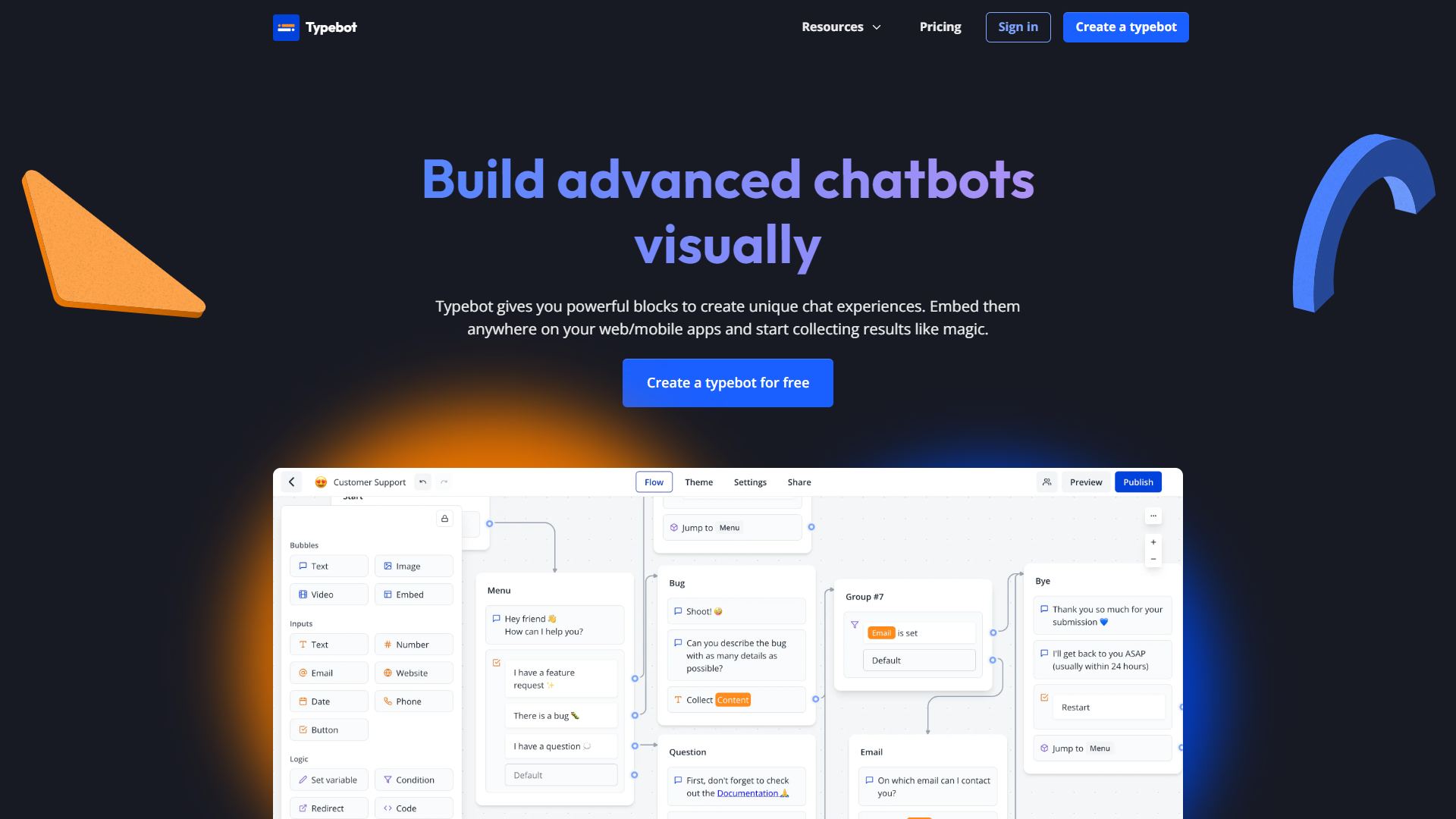
Typebot is a powerful platform designed to help users create chatbots without needing extensive coding skills. It provides a user-friendly interface that allows anyone, from beginners to tech-savvy individuals, to develop engaging chat experiences. With Typebot, businesses can automate responses and improve customer interactions effectively.
The platform supports various integrations and offers templates that make it easy to get started. Users can customize their bots to suit their brand's voice and style, ensuring a seamless experience for their customers. Additionally, Typebot offers analytics features, helping users understand how their bots are performing and where improvements can be made.
In a world where digital communication is vital, Typebot stands out as a reliable solution for those looking to enhance customer engagement. Whether it's for customer support, marketing, or just improving user experience, Typebot provides the tools you need to succeed.
Pricing
| Plan | Price | Description |
|---|---|---|
| Personal | Free (Per Month) | - |
| Personal Pro | $39.00 (Per Month) | For solo creators who want to do even more. |
| Team | $99.00 (Per Month) | For teams to build typebots together in one spot. |
Key features
User-friendly interface
Easy for anyone to navigate and build chatbots without coding.
Customizable templates
Offers a range of templates that can be tailored to fit specific needs.
Multi-platform support
Works across various platforms like websites, social media, and messaging apps.
AI-powered responses
Utilizes machine learning to provide smart and relevant answers.
Analytics dashboard
Tracks bot performance and helps users optimize interactions.
Integration capabilities
Connects seamlessly with popular apps and services.
Drag-and-drop builder
Simplifies the bot-building process with a visual approach.
Real-time updates
Allows users to make changes to their bots live without any downtime.
Pros & Cons
Pros
- No coding required
- Cost-effective
- Engaging user experience
- Regular updates
- Robust support
Cons
- Learning curve
- Limited design options
- Performance issues
- Pricing tiers
- Dependent on internet
Feature Ratings
Based on real user reviews, here's how users rate different features of this product.
Responses
Based on 15 Typebot reviews. Customize your chat workflows with rules and automations.
Based on 15 reviewsAs reported in 15 Typebot reviews. Control who the chatbot converses with (and when).
Based on 15 reviewsBased on 15 Typebot reviews. Can provide interlocators with menus, through which they can choose a relevant response.
Based on 15 reviewsAs reported in 15 Typebot reviews. Can send triggered sequence of automated messages sent on a predefined schedule in a targeted fashion.
Based on 15 reviewsPlatform
As reported in 15 Typebot reviews. Allows easy integrations with applications, such as messenger applications, APIs, and customer support tools.
Based on 15 reviewsHas the ability to customize look and feel of chatbot to match` company branding. 15 reviewers of Typebot have provided feedback on this feature.
Based on 15 reviewsBased on 15 Typebot reviews. Gives user the ability to analyze conversations with the chatbot and see its performance.
Based on 15 reviewsAllows for varying access to chatbot and admin settings, depending on user, their role, etc. 15 reviewers of Typebot have provided feedback on this feature.
Based on 15 reviewsCan collect and store information from interlocators, such as email, phone number, etc. This feature was mentioned in 15 Typebot reviews.
Based on 15 reviewsRating Distribution
Screenshots
User Reviews
View all reviews on G2A smart survey form for businesses
What do you like best about Typebot?
It helps us in creating specific forms that can better understanding of customer behaviour and what they think about our services. It is like the survay which helps businesses in analysing the overall quality of business operations and customer experience that a company is providing.
What do you dislike about Typebot?
The platform has some pre made templates available for building conversational forms but they have limited customisation and also does not allows to adds graphs and surveys in the forms. I have also felt that they can work their software so that it can become better compatible with mobile devices also.
What problems is Typebot solving and how is that benefiting you?
In the day to day challenges conducting surveys through chatbots is one of the crucial part of businesses and after installation of typebot it has become a simple task for our team to launch different types of chatbots as per need of the business. However it is little costly so it might not be affordable for all kind of business owners.
Make chat flow simpler with Typebot
What do you like best about Typebot?
Typebot is one of the best code less platform which Helps in creating platforms that could be used for chatting, sales, leads management, customer support and many more. This platform helps in creating customised softwares that can be used for different kind of i...
Great tool to save time
What do you like best about Typebot?
I love platforms that helps me saving time in my day-to-day routine, and Typebot has been game changer for me
I used to use a well known forms platform to send customers information after their first purchase in out company, but the interface was not friendly an...
Creates chatbots according to your need
What do you like best about Typebot?
Typebot helps us in Creating multiple chatbots mainly for resolving the queries of our customer and understand their needs it is a kind of tool which helps in create ai based customer support bots without any proper use of professional codes also we do not need t...
Now AI will help users to create small chatbots
What do you like best about Typebot?
Typebot is a fully AI based plaform that help us to create small and customised chatting options for different types of businesses without any technical knowledge and codings and also the best part of using typebot was it was quite easy to integrate it with our w...
Company Information
Alternative Conversational Intelligence tools


FAQ
Here are some frequently asked questions about Typebot.
Typebot is a platform that allows users to create chatbots easily without needing coding skills.
No, Typebot is designed for users with little to no coding experience.
Yes, Typebot can be integrated with various platforms including websites and social media.
Yes, Typebot provides excellent customer support and resources to help users.
Yes, Typebot offers a free trial for users to explore its features before committing.
Yes, Typebot allows users to customize templates to fit their brand's style.
You can create various bots for customer support, sales, and marketing purposes.
Typebot automates responses and provides timely information to improve user experience.


