
PopSQL
PopSQL is a collaborative SQL editor for teams.
Overview
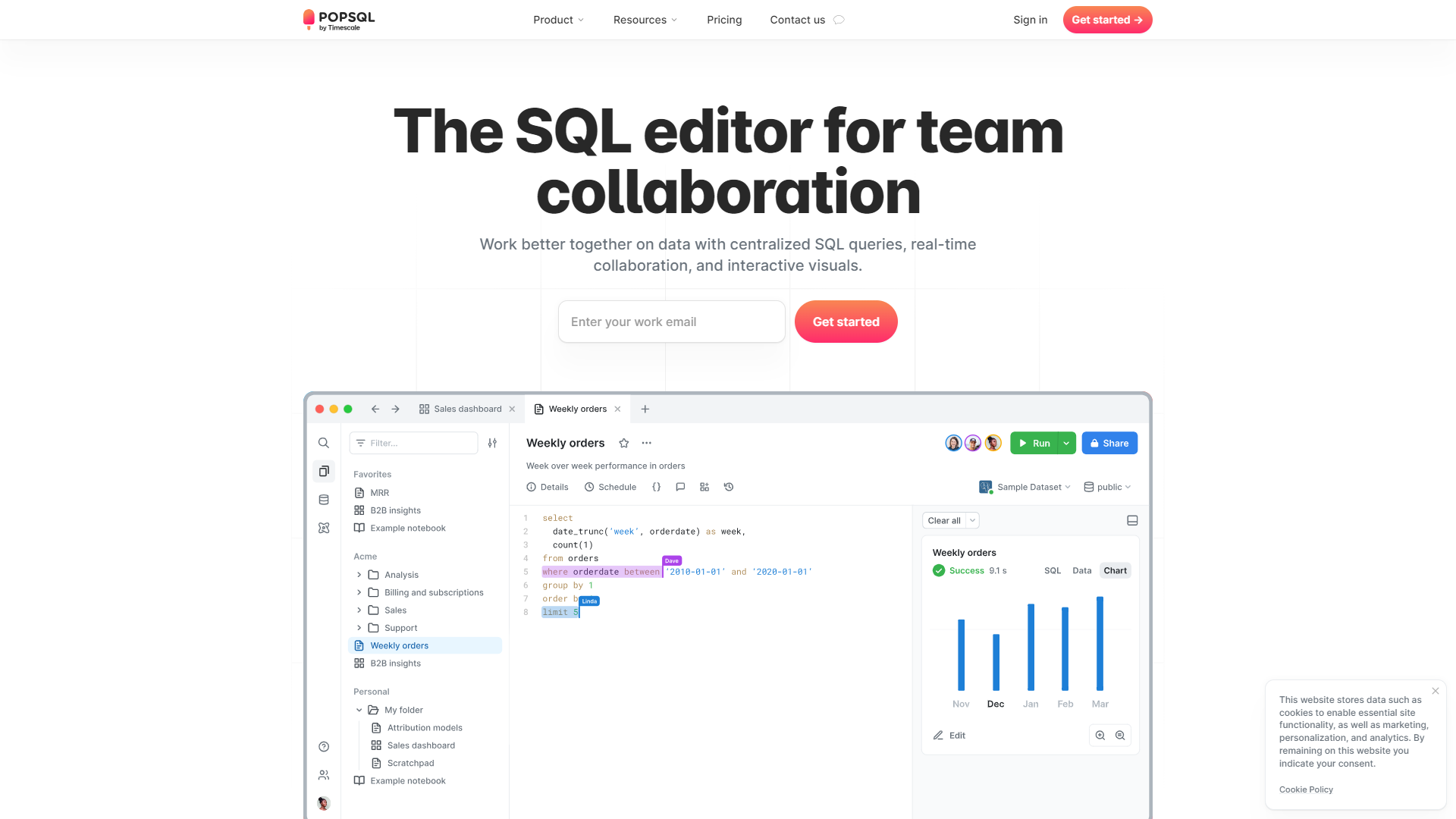
PopSQL allows teams to work together on databases, making it easier to manage and write SQL queries. It helps users visualize and share their data insights in a simple way. Whether you're an analyst or a developer, PopSQL streamlines the process of interaction with your data, promoting efficient collaboration.
Pricing
| Plan | Price | Description |
|---|---|---|
| Free | Free (1 Editors Per Month) | Just the basics |
| Premium | Starting at $19.00 (1 Editors Per Month) | Collaborative SQL editor for your team |
| Business | Starting at $36.00 (1 Editors Per Month) | Business intelligence for your company |
| Enterprise | Contact Us (1 Editors Per Year) | Custom plans tailored for the needs of your organization |
Key features
Collaboration
Teams can work together on SQL queries in real-time, allowing for instant feedback and teamwork.
Visual Query Builder
This feature helps users design queries without needing to write SQL code, making it accessible for beginners.
Database Connections
Easily connect to multiple databases, whether they are local or in the cloud.
Query History
Keep track of all your previous queries and easily reuse them when needed.
Data Visualization
Create charts and graphs from your SQL results to better understand your data.
Result Sharing
Share your query results with team members via links or export them to various formats.
Custom Snippets
Save commonly used queries as snippets for quick access, saving time on future work.
Cross-Database Support
Work with various types of databases like MySQL, PostgreSQL, and more in one platform.
Pros & Cons
Pros
- User-Friendly
- Real-Time Collaboration
- Versatile
- Visual Tools
- Time-Saving Features
Cons
- Subscription Cost
- Learning Curve
- Limited Offline Features
- Performance
- Customization
Feature Ratings
Based on real user reviews, here's how users rate different features of this product.
Reports
Reports interface for standard and self-service reports is intuitive and easy to use. This feature was mentioned in 27 PopSQL reviews.
Based on 27 reviewsBased on 22 PopSQL reviews. Requires a minimal number of steps/clicks to answer business question.
Based on 22 reviewsOffers a variety of attractive graph and chart formats. 24 reviewers of PopSQL have provided feedback on this feature.
Based on 24 reviewsScore cards visually track KPI's. 16 reviewers of PopSQL have provided feedback on this feature.
Based on 16 reviewsBased on 23 PopSQL reviews. Provides business users an interface to easily design, refine and collaborate on their dashboards
Based on 23 reviewsBased on 17 PopSQL reviews. Reports interface for standard and self-service reports is intuitive and easy to use.
Based on 17 reviewsBased on 19 PopSQL reviews. Receive email reports and notifications regarding metrics.
Based on 19 reviewsRequires a minimal number of steps/clicks to answer business question. 13 reviewers of PopSQL have provided feedback on this feature.
Based on 13 reviewsSelf Service
Based on 17 PopSQL reviews. Using formulas based on existing data elements, users can create and calculate new field values.
Based on 17 reviewsBased on 26 PopSQL reviews. Business users have the ability to filter data in a report based on predefined or automodeled parameters.
Based on 26 reviewsBased on 26 PopSQL reviews. Users can drill down and explore data to discover new insights.
Based on 26 reviewsAbility to search global data set to find and discover data. This feature was mentioned in 30 PopSQL reviews.
Based on 30 reviewsAs reported in 30 PopSQL reviews. Ability for users to share data and reports they have built within the BI tool and outside the tool through other collaboration platforms.
Based on 30 reviewsAs reported in 12 PopSQL reviews. Tool automatically suggests data types, schemas and hierarchies.
Based on 12 reviewsAdvanced Analytics
Based on 15 PopSQL reviews. Analyze current and historical trends to make predictions about future events.
Based on 15 reviewsCommunicate complex information clearly and effectively through advanced graphical techniques. This feature was mentioned in 33 PopSQL reviews.
Based on 33 reviewsAs reported in 21 PopSQL reviews. Ability to handle large, complex, and/or siloed data sets.
Based on 21 reviewsBuilding Reports
As reported in 20 PopSQL reviews. Converts data formats of source data into the format required for the reporting system without mistakes.
Based on 20 reviewsBased on 20 PopSQL reviews. Ability to (re)structure data in a manner that allows extracting insights fast and accurate.
Based on 20 reviewsBased on 17 PopSQL reviews. Provides business users an interface to easily design and refine their dashboards and reports. (What You See Is What You Get)
Based on 17 reviewsAs reported in 14 PopSQL reviews. Application Programming Interface - Specification for how the application communicates with other software. API's typically enable integration of data, logic, objects, etc with other software applications.
Based on 14 reviewsData Updates
Based on 17 PopSQL reviews. Ability to track historical data.
Based on 17 reviewsTrack metrics in real time with consistent and frequent updates. This feature was mentioned in 19 PopSQL reviews.
Based on 19 reviewsAs reported in 12 PopSQL reviews. Receive email reports and notifications regarding metric.
Based on 12 reviewsAs reported in 17 PopSQL reviews. Ability to track historical data.
Based on 17 reviewsTrack metrics in real time with consistent and frequent updates. 17 reviewers of PopSQL have provided feedback on this feature.
Based on 17 reviewsModel Development
Supports programming languages such as Java, C, or Python. Supports front-end languages such as HTML, CSS, and JavaScript
Offers the ability for developers to drag and drop pieces of code or algorithms when building models
Provides users with pre-built algorithms for simpler model development
Supplies large data sets for training individual models
Provides users with pre-built algorithms for simpler model development
Supplies large data sets for training individual models
Transforms raw data into features that better represent the underlying problem to the predictive models
Machine/Deep Learning Services
Offers image recognition services
Offers natural language processing services
Offers natural language generation services
Offers artificial neural networks for users
Offers image recognition services
Offers natural language understanding services
Offers natural language generation services
Provides deep learning capabilities
Deployment
Manages the intelligent application for the user, reducing the need of infrastructure
Allows users to insert machine learning into operating applications
Provides easily scaled machine learning applications and infrastructure
Manages the intelligent application for the user, reducing the need of infrastructure
Allows users to insert machine learning into operating applications
Provides easily scaled machine learning applications and infrastructure
System
Gives user ability to import a variety of data sources for immediate use
Supports programming languages such as Java, C, or Python. Supports front-end languages such as HTML, CSS, and JavaScript
Offers the ability for developers to drag and drop pieces of code or algorithms when building models
Data Preparation
Ability to connect the analytics platform with a wide range of connector options for common data sources, including popular enterprise applications.
Connects to enterprise data governance software, or provides integrated data governance features to avoid misuse of data
Data Modeling and Blending
Using formulas based on existing data elements, users can create and calculate new field values
Business users have the ability to filter data in a report based on predefined or automodeled parameters.
Allows the user to combine data from multiple sources into a functioning dataset.
Maintenance
Based on 21 PopSQL reviews. Allows data movement from one database to another.
Based on 21 reviewsAs reported in 22 PopSQL reviews. Provides data backup and recovery functionality to protect and restore a database.
Based on 22 reviewsAs reported in 26 PopSQL reviews. Allows users to access and work on data concurrently, supporting several views of the data.
Based on 26 reviewsManagement
Stores the database metadata, that is the definitions of data elements, types, relationships etc. This feature was mentioned in 21 PopSQL reviews.
Based on 21 reviewsCreates a copy of the database to maintain consistency and integrity. This feature was mentioned in 19 PopSQL reviews.
Based on 19 reviewsBased on 30 PopSQL reviews. Allows users to create, update and retrieve data in a database.
Based on 30 reviewsDefines the logical design of the data before building the schemas. 23 reviewers of PopSQL have provided feedback on this feature.
Based on 23 reviewsBased on 23 PopSQL reviews. Monitors and analyzes critical database attributes like query performance, user sessions, dead lock detail, system errors etc and visualize them on a custom dashboard.
Based on 23 reviewsSecurity
Based on 17 PopSQL reviews. Encrypts and transforms data at the database from a readable state into a ciphertext of unreadable characters.
Based on 17 reviewsAllows restricted user acess to modify depending on the access level. This feature was mentioned in 24 PopSQL reviews.
Based on 24 reviewsVisualization
Based on 17 PopSQL reviews. Offers a variety of attractive graph and chart formats.
Based on 17 reviewsBased on 14 PopSQL reviews. Score cards visually track KPI's.
Based on 14 reviewsProvides business users an interface to easily design, refine and collaborate on their dashboards 18 reviewers of PopSQL have provided feedback on this feature.
Based on 18 reviewsAllows one to create and export visualization into various formats (PNG, JPEG, etc.) This feature was mentioned in 14 PopSQL reviews.
Based on 14 reviewsCollaboration
Provides the ability to easily share visualizations. 23 reviewers of PopSQL have provided feedback on this feature.
Based on 23 reviewsAllows multiple users to edit and create visualizations together. This feature was mentioned in 23 PopSQL reviews.
Based on 23 reviewsHas the ability to edit visualization across devices and device types (e.g. computer and phone). 14 reviewers of PopSQL have provided feedback on this feature.
Based on 14 reviewsRating Distribution
Screenshots
User Reviews
View all reviews on G2PopSQL is the most seamless database client out there!
What do you like best about PopSQL?
- User Interface. It's smooth, modern and easy to use.
- Easy to setup connections
- Parameterized Queries
- SQL query autocomplete suggestions
- Schema introspections
I started using PopSQL almost 2 years ago, and it's always my go-to for querying a relational database. I first learned about it in a freecodecamp video on learning SQL, and having tried over a dozen other market offerings for SQL clients, I can confidently say that PopSQL is the best out there!
The user interface is one of its strongest points, having a sleek, responsive and reactive layout that keeps the important elements in focus. Outdated UIs like pgAdmin, dbeaver and mysqlworkbench do not have the same smoothness or UX.
The parameterized queries are a blessing for plugging in values through a dropdown, selection or otherwise. The introspection is fast, and shows all relevant data such as column names and types in milliseconds!
What do you dislike about PopSQL?
While I'm aware that PopSQL has more features like Dashboarding, query alerts and others, I just don't use them as much, and just prefer it as a reliable SQL client that can help me get my database work done with the least amount of effort.
What problems is PopSQL solving and how is that benefiting you?
PopSQL is making data accessibility easier for both individuals and organizations. I'm more productive when I use it and can easily share queries with teammates thus improving collaboration. There's no huge technical barrier between me and the database when I'm using PopSQL. Their support system is excellent, and customer care is quite helpful.
Seamless SQL Querying Experience with popSQL. Very User Friendly and Veryuseful Application
What do you like best about PopSQL?
I like the below things most in PopSQL:
1) It is very user friendly.
2) The interface is very simple and easy to use. There is no unnecessary stuff which is not needed.
3) In a single application we can access to both Snowflake, DBT and many more.
4) Unline other...
PopSQL: Elegant, Minimalist Design SQL Editor
What do you like best about PopSQL?
PopSQL has a user interface that's easy to navigate resembling the smooth experience of using Mac software.
The ability to run Ad Hoc SQL analytics and share data is a game changer, for my team. I can effortlessly create queries to retrieve data, schedule tasks a...
Empowering Data Explorations :PopSQL
What do you like best about PopSQL?
1- Query Version Control : its allowing users to track changes and collaborate seamlessy with team members on data queries
2-Database Connection Management : its have a ability to manage multiple database connection within the platform
3-Database Support : its sup...
Clean UI, easy to collaborate and neat Slack integration!
What do you like best about PopSQL?
As a developer, I love PopSQL's scratchpad. Very clean interface to write queries and see results on the right of the screen. It also shows you results from previous runs of queries. You can write multiple queries and it only runs the one where your cursor is. I l...
Company Information
Alternative Data Science And Machine Learning Platforms tools


FAQ
Here are some frequently asked questions about PopSQL.
PopSQL is a collaborative SQL editor designed to help teams write and share SQL queries easily.
Yes, PopSQL allows you to connect to and manage multiple databases from one user interface.
PopSQL offers a free tier, but full features require a subscription.
In PopSQL, multiple users can edit and view queries at the same time, which enhances teamwork.
PopSQL supports many databases, including MySQL, PostgreSQL, and more.
Yes, you can create charts and graphs directly from your SQL query results.
Absolutely! It has user-friendly features that help beginners learn SQL.
Currently, PopSQL does not have a dedicated mobile app; it is primarily web-based.


